

You ask ChatGPT to “write a post”. The answer is tidy but generic enough for almost any business. You add “make it professional”, and the sentences get longer without becoming more useful.
Try giving it the details you would give a colleague: the subject, the audience and the information it must preserve. After the first response, improve the specific part that needs work instead of restarting the whole task.
ChatGPT is an OpenAI assistant you interact with through conversation. It can support explanation, idea development, drafting and reviewing material you provide. A useful workflow starts with a clear request and ends with a reviewed result.
On this page
What can you use ChatGPT for?
You can ask it to explain a concept, outline an article, organise notes or help compare options against your own criteria. Some tasks require additional tools, such as web search or file handling, depending on what is available to your account.
The official ChatGPT usage guide introduces the available ways to work. For the wider context, see the introduction to artificial intelligence.
Start your first conversation
Visit chatgpt.com or use an app from the official source. Follow the sign-in steps shown and start a new conversation. Labels and available features may differ between the web, apps and account types.
Begin with a small task you understand, such as explaining a term or organising non-sensitive notes. Read the response, then send a specific follow-up: “shorten the introduction” or “make the second example easier to follow”. A targeted revision is easier to assess than “improve this”.
Write a useful request
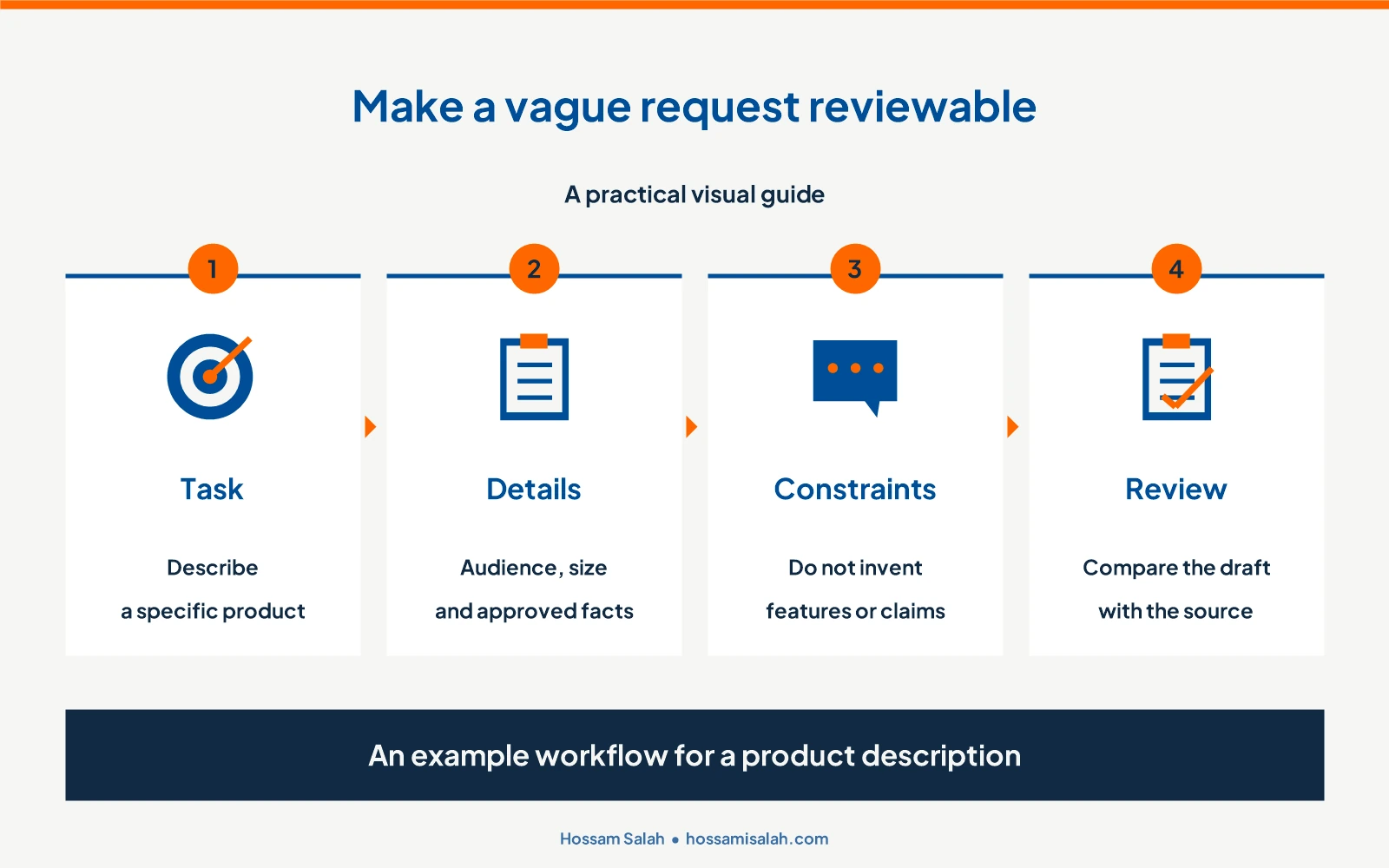
Start with the action and add information that changes the answer. A product description needs product specifications. A beginner’s explanation needs the reader’s starting level. An approved document needs a clear distinction between what can change and what must stay intact.
OpenAI’s prompting guidance encourages clear requests and follow-up refinement. My practical starting point is a task whose result you can judge, followed by the missing detail that improves it.Write an 80–100-word description for a laptop bag aimed at daily commuters. Approved details: fits a 15.6-inch laptop, includes an internal pocket and an adjustable strap. Use clear language. Do not add materials, warranties or features that I have not supplied. Finish with a question about any missing information needed before publication.
This is an instructional example using invented specifications. Replace them with your actual product information. The request provides source material and makes unsupported additions easier to detect during review.
Refine the response with specific feedback
If the opening is generic, explain what makes it generic: “This could describe any product. Start with the experience of carrying the bag on a commute, and preserve the specifications.” If the answer is too long, state a target length and the information that must remain.
Ask for two alternatives to one paragraph, choose the better one and review the full piece again. A local revision can introduce a repeated idea or accidentally change a detail elsewhere.
You can also ask the assistant to list any features it added without evidence. That is a useful additional check, but still compare the draft against the original specifications yourself.
Three practical tasks to try
1. Learn a concept
Explain the difference between revenue and profit to a beginner using one simple numerical example. Then ask me a question to check my understanding and wait for my answer.
Attempt the question yourself. If a step remains unclear, ask for that step to be explained differently. Aim to understand and apply the idea rather than merely collect a polished summary.
2. Organise meeting notes
Turn the following notes into a table with decision, owner and deadline columns. If information is absent, write “not specified” instead of inferring it. Notes: [add a version suitable for sharing].
Compare the table with your notes, especially names, responsibilities and dates. Use material you are authorised to share, and remove sensitive details where appropriate before uploading.
3. Compare two offers
Help me compare two offers using only the information I provide. The criteria are cost, delivery and support. Identify missing information before recommending a choice. Offer one: […]. Offer two: […].
This helps structure a decision. Before committing to a purchase, check the written offers and confirm that prices and conditions remain current.
When should you use web search?
If a question depends on current information, such as a price, release or usage condition, request web research and official sources. Open the cited page and check its date and relevant market.
Web search can support research, but a sourced fact and an analytical suggestion are different things. Rewriting a message using information you already supplied may not need a search at all.Work with a file or image
When uploads are available, provide the relevant material and specify the task. Replace “analyse this file” with “extract the cost items, total them and identify rows with missing values”.
For scanned PDFs or unclear tables, request page or row references and compare a sample with the original. For numerical work, check a simple total yourself before relying on a larger analysis.
Check the output before using it
Review three things: facts, meaning and presentation. Are the numbers and sources correct? Does the text say what you intend? Does the format suit its destination?
For content, remove generic sentences that contribute little and add the details that make the example understandable. In a content marketing workflow, check which reader question the piece answers before adjusting its length.

Privacy and free-plan limits
Before sharing client files or personal information, check your authority to share it, the account settings and the provider’s policy. Controls vary by account and workspace. OpenAI’s data controls guide describes the current options.
You can start with a free plan, while tools such as uploads and image generation have usage limits that can change. Check the Free tier FAQ and plan comparison rather than relying on an old fixed allowance.
Frequently asked questions
Can ChatGPT write in Egyptian Arabic?
You can request Egyptian Arabic and supply a short sample of your style. Review the wording and meaning, particularly specialist terms.
Does a prompt have to be long?
No. A short, clear request can be sufficient. Add details when they affect the result rather than padding the task with unrelated instructions.
Why does it sometimes provide incorrect information?
Generated text can contain errors and unsupported inferences. Provide suitable sources, ask it to identify missing information and verify facts before using them.
Should I begin with a free or paid plan?
Start with the task and what your account provides. Consider upgrading when a specific limit affects your actual work.
Try a small task of your own
Choose a paragraph or some non-sensitive notes, make your request and refine the result twice with specific feedback. Keep a reviewed prompt that works and improve it with use. When you need a different capability, return to the AI tools selection guide.